
Skip to content
  • Events
  • Routes
ZwiftHacks
  • Home
  • Desktop ToolsExpand
    • Automate and save mouse clicksExpand
      • zwift-login
      • zwift-hotkeys
    • Other toolsExpand
      • TR-Z-move
  • Online ToolsExpand
    • Events on Zwift
    • Routes
  • Other thingsExpand
    • Top Tips & Tricks
    • Posts
    • Historic…Expand
      • Settings and route selectionExpand
        • zwift-preferences (for Windows)
        • ZwiftPref for macOS & Windows – Change world and other settings
      • Maps and Onscreen DisplaysExpand
        • ZwiftMap (macOS and Windows)
      • parse-zwift-logs
      • ZwUp – make Zwift topmost and transparent
      • The Whoa! Stopper
      • What is my Zwift ID?
      • MAP and FTP Calculator
      • Online workout editorExpand
        • Simple ZWO Creator
      • Updates
  • About…
  • Contact…
ZwiftHacks
  • Update | Windows | ZwiftMap

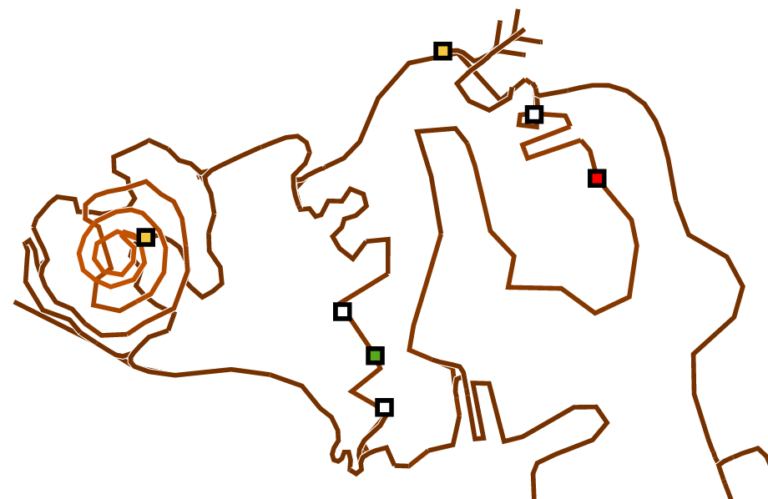
    Volcano climb in ZwiftMap Classic

    ByJesper [ZwiftHacks] 2017-03-032017-09-06

    There are new downloads for ZwiftMap Classic with the Volcano climb included in the Watopia map. In the future ZwiftMap Classic can download a new map definition automatically so you will not have to download and install the program again just because of some new roads (as long as they fit within the old boundaries of…

    Read More Volcano climb in ZwiftMap ClassicContinue

  • Hey, did you see the new road?
    macOS | Watopia | Web | Windows | ZwiftMap

    Hey, did you see the new road?

    ByJesper [ZwiftHacks] 2017-03-022017-09-06

    Today, Zwift released an route extension to Watopia. Ride it and let ZwiftMap show you where you are! The ZwiftMaps here from ZwiftHacks automatically retrieve the new map from our server so you don’t have to download anything*. Check out the new map online here: https://api.zwifthacks.com/zwiftmap/app/world/1/ Or better: Ride your bike or run the the…

    Read More Hey, did you see the new road?Continue

  • Use the <WORLD> hack and ZwiftMap together!
    ZwiftMap | ZwiftPref

    Use the <WORLD> hack and ZwiftMap together!

    ByJesper [ZwiftHacks] 2017-01-272017-09-06

    This is nice to know about the ZwiftMap app: Just curious – if you use ZwiftPref and select a route that is not on the calendar for the current day, the ZwiftMap app seems to only put the map up for the correct course for the day? There is a trick! Start ZwiftMap first and then…

    Read More Use the <WORLD> hack and ZwiftMap together!Continue

Tools from ZwiftHacks

  • zwift-login
  • TR-Z-move
  • zwift-hotkeys

Who runs ZwiftHacks?

This site is run by Jesper Rosenlund Nielsen, a Zwift rider since 2015, and is not affiliated with the Zwift company in any way.

You can find Zwift (the company) at zwift.com

ZwiftHacks is also at various social media:

  • Facebook
  • Twitter
  • Mastodon

Meta

  • Log in
  • Entries feed
  • Comments feed
  • WordPress.org
  • About…
  • Friends of the House
  • Contact…

© Jesper Rosenlund Nielsen © 2016-2026 - WordPress Theme by Kadence WP

Scroll to top
  • Home
  • Desktop Tools
    • Automate and save mouse clicks
      • zwift-login
      • zwift-hotkeys
    • Other tools
      • TR-Z-move
  • Online Tools
    • Events on Zwift
    • Routes
  • Other things
    • Top Tips & Tricks
    • Posts
    • Historic…
      • Settings and route selection
        • zwift-preferences (for Windows)
        • ZwiftPref for macOS & Windows – Change world and other settings
      • Maps and Onscreen Displays
        • ZwiftMap (macOS and Windows)
      • parse-zwift-logs
      • ZwUp – make Zwift topmost and transparent
      • The Whoa! Stopper
      • What is my Zwift ID?
      • MAP and FTP Calculator
      • Online workout editor
        • Simple ZWO Creator
      • Updates
  • About…
  • Contact…
Search