Tools updated for new Zwift folder location
The following tools have been updated to work with the new location for prefs.xml and log files under the %localappdata% folder:

The following tools have been updated to work with the new location for prefs.xml and log files under the %localappdata% folder:
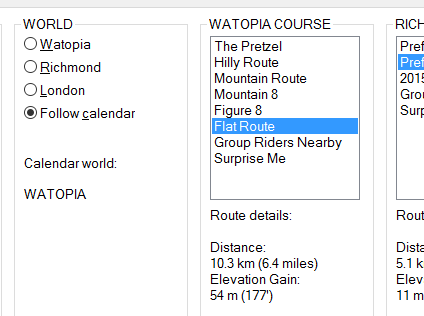
A minor bug in zwift-preferences in time zone conversion (when displaying data from MapSchedule.xml) has been fixed. Other changes: You can now open prefs.xml from the Other menu, the minimal leaderboards option is now included, plus some tweaking on the Miscellaneous tab.
The most recent version of zwift-preferences now shows you information about the current world on the calendar (did anybody else notice the MapSchedule.xml file in the documents\zwift folder ?) and provides details about the selected routes.
A cleaner looking tabbed version of zwift-preferences is now ready. Btw it supports the new Neo Road Feel setting, too. I now also offer a compiled version so you do not have to install AutoHotkey to make the script work on your pc.
Finally uploaded a bug fix version for http://staging1792839621.zwifthacks.com/zwift-preferences/ from 2016/08/22. Corrects a possible bug in earlier version of the script which meant that a choice of a London course could be saved incorrectly
zwift-preferences has just been updated to support the new London courses. You can now easily switch between all three courses/worlds without having to edit the prefs.xml file yourself.
zwift-preferences has finally been updated to support the new way of storing route preferences in the prefs.xml file (was introduced by Zwift in April). Now you can select all the different pre-defined routes that Zwift offers.
There is a new version of zwift-preferences which supports the new Mountain 8 and The Pretzel route preferences as well as the setting Language Filtering. I have also included support for the settings Flag and IgnoreGodMessages which I have no idea what are for!
A new version of zwift-preferences is ready for download. New functionality: Toggle ERG mode Menu bar added Reload from prefs.xml Launch My Dashboard on zwift.com from the menu or with Ctrl+D