ZwiftMap version 1
ZwiftMap version 1 is ready for download!

ZwiftMap version 1 is ready for download!
zwift-hotkeys has been updated with several new keyboard shortcuts and fixes. Some of the changes are: Keyboard shortcuts (R or Left Alt+R) for toggling between Running and Riding in pairing screen Keyboard shortcuts (1-5 or Left Alt+1/../5) for selecting which device to search for in the pairing screen. The number shortcuts work for choosing a device…
Here is a summary for week 48 of news from ZwiftHacks which didn’t get its own post during the week: Filter route badges by cycling/running.
zwift-preferences has finally been updated to support the new way of storing route preferences in the prefs.xml file (was introduced by Zwift in April). Now you can select all the different pre-defined routes that Zwift offers.
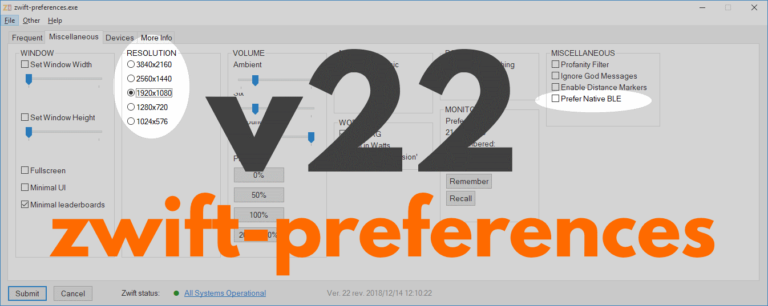
zwift-preferences skips version 21 and jumps straight to version 22 with support for changing the preferred screen resolution and toggle the Prefer Native BLE setting on the Miscellaneous tab. Download the update Get the new version 22 over at the zwift-preferences page.

There is a minor update to ZwiftMap: When the map can be dragged it has a dotted frame. This makes it much easier for you to see if the magic key combo works. Otherwise nothing has changed. Download links are in the original announcement post.
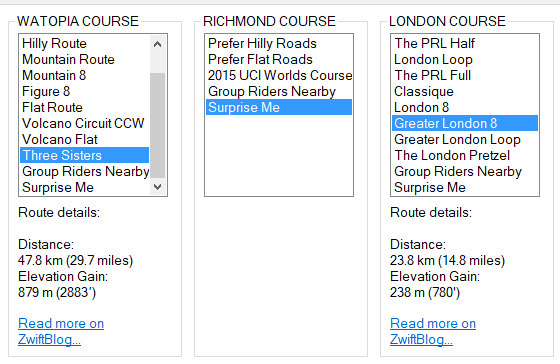
The addon zwift-preferences (Windows only) now has all the possible route selections, including Three Sisters, Greater London 8, Greater London Loop, and The London Pretzel. The downloads are already live in the usual place… Teaser: ZwiftPref (for macOS and Windows) will soon have route selection, too ….