Skip to content
  • Events
  • Routes
ZwiftHacks
  • Home
  • Desktop ToolsExpand
    • Automate and save mouse clicksExpand
      • zwift-login
      • zwift-hotkeys
    • Other toolsExpand
      • TR-Z-move
  • Online ToolsExpand
    • Events on Zwift
    • Routes
  • Other thingsExpand
    • Top Tips & Tricks
    • Posts
    • Historic…Expand
      • Settings and route selectionExpand
        • zwift-preferences (for Windows)
        • ZwiftPref for macOS & Windows – Change world and other settings
      • Maps and Onscreen DisplaysExpand
        • ZwiftMap (macOS and Windows)
      • parse-zwift-logs
      • ZwUp – make Zwift topmost and transparent
      • The Whoa! Stopper
      • What is my Zwift ID?
      • MAP and FTP Calculator
      • Online workout editorExpand
        • Simple ZWO Creator
      • Updates
  • About…
  • Contact…
ZwiftHacks
  • What was new this week?
    Update | Windows

    What was new this week?

    ByJesper [ZwiftHacks] 2020-12-052026-03-17

    Here is a summary for week 48 of news from ZwiftHacks which didn’t get its own post during the week: Show all routes for an event; No more support for legacy Edge (and IE)

    Read More What was new this week?Continue

  • What was new this week?
    Update

    What was new this week?

    ByJesper [ZwiftHacks] 2020-11-282021-01-22

    Here is a summary for week 48 of news from ZwiftHacks which didn’t get its own post during the week: Filter route badges by cycling/running.
    Read More What was new this week?Continue

  • zwift-hotkeys v16 – A Fix for the Back button
    AutoHotkey | Update | Windows | zwift-hotkeys

    zwift-hotkeys v16 – A Fix for the Back button

    ByJesper [ZwiftHacks] 2020-11-212021-01-02

    zwift-hotkeys v16 fixes the Backspace key. Now it will also click the blue Back button (in the Paused screen) when in ultrawide mode.
    Read More zwift-hotkeys v16 – A Fix for the Back buttonContinue

  • What was new this week?
    Update | Windows | zwift-preferences

    What was new this week?

    ByJesper [ZwiftHacks] 2020-11-212021-01-02

    Here is a summary for week 47 of news from ZwiftHacks which didn’t get its own post during the week
    Read More What was new this week?Continue

  • Updates to TR-Z-move
    AutoHotkey | TR-Z-move | Update | Windows

    Updates to TR-Z-move

    ByJesper [ZwiftHacks] 2020-11-152026-03-17

    TR-Z-move is updated to version 8 with a couple of new features.
    Read More Updates to TR-Z-moveContinue

  • Ignore the script error in Zwift’s launcher with zwift-login
    AutoHotkey | Update | Windows | zwift-login

    Ignore the script error in Zwift’s launcher with zwift-login

    ByJesper [ZwiftHacks] 2020-11-152021-01-02

    The new version version of zwift-login will automatically skip the annoying script error message which just recently started to appear in Zwift’s launcher.
    Read More Ignore the script error in Zwift’s launcher with zwift-loginContinue

  • Fixing missing ride data in ZwiftMap
    macOS | Update | Windows | ZwiftMap

    Fixing missing ride data in ZwiftMap

    ByJesper [ZwiftHacks] 2020-11-142026-03-17

    ZwiftMap 2.1.8 fixes a problem with missing ride data. The problem started to show a few days ago, seemingly because of a change in Zwift.
    Read More Fixing missing ride data in ZwiftMapContinue

  • What was new this week?
    Events | Update | Web | Website

    What was new this week?

    ByJesper [ZwiftHacks] 2020-11-082021-01-02

    Here is a summary for week 45 of new features, changes, bug fixes, and content, which didn’t get their own posts here at ZwiftHacks.

    Read More What was new this week?Continue

  • What was new this week?
    Events | Routes | Update | Web | Website | Windows | ZwiftMap

    What was new this week?

    ByJesper [ZwiftHacks] 2020-11-012021-01-02

    Here is a summary for week 44 of new features, changes, bug fixes, and content, which didn’t get their own posts.
    Read More What was new this week?Continue

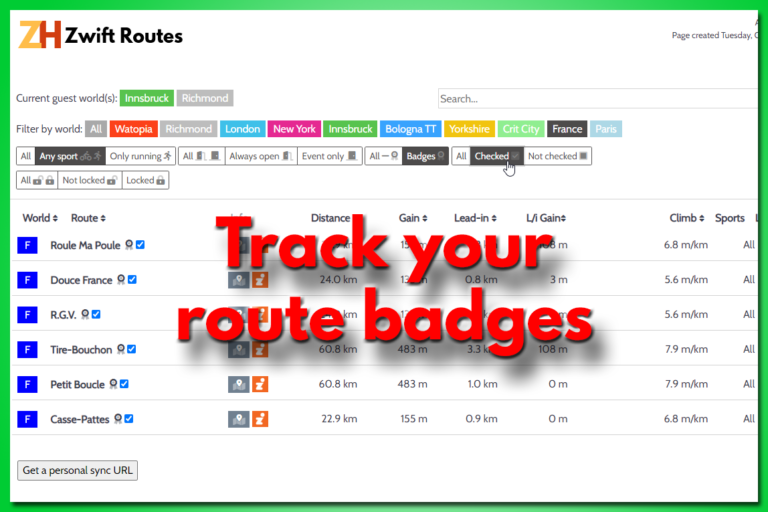
  • A new way to track your route badges
    Events | Routes | Update | Web | Website

    A new way to track your route badges

    ByJesper [ZwiftHacks] 2020-10-102021-06-25

    There is a new way to track your route badges. It doesn’t require you to create any user account but simply stores the info in your browser. It also gives you a dedicated URL / web page address you can bookmark. Use that and you can access your data from anywhere. The Zwift Routes page…

    Read More A new way to track your route badgesContinue

Page navigation

Previous PagePrevious 1 … 3 4 5 6 7 … 14 Next PageNext

Tools from ZwiftHacks

  • zwift-login
  • TR-Z-move
  • zwift-hotkeys

Who runs ZwiftHacks?

This site is run by Jesper Rosenlund Nielsen, a Zwift rider since 2015, and is not affiliated with the Zwift company in any way.

You can find Zwift (the company) at zwift.com

ZwiftHacks is also at various social media:

  • Facebook
  • Twitter
  • Mastodon

Meta

  • Log in
  • Entries feed
  • Comments feed
  • WordPress.org
  • About…
  • Friends of the House
  • Contact…

© Jesper Rosenlund Nielsen © 2016-2026 - WordPress Theme by Kadence WP

Scroll to top
  • Home
  • Desktop Tools
    • Automate and save mouse clicks
      • zwift-login
      • zwift-hotkeys
    • Other tools
      • TR-Z-move
  • Online Tools
    • Events on Zwift
    • Routes
  • Other things
    • Top Tips & Tricks
    • Posts
    • Historic…
      • Settings and route selection
        • zwift-preferences (for Windows)
        • ZwiftPref for macOS & Windows – Change world and other settings
      • Maps and Onscreen Displays
        • ZwiftMap (macOS and Windows)
      • parse-zwift-logs
      • ZwUp – make Zwift topmost and transparent
      • The Whoa! Stopper
      • What is my Zwift ID?
      • MAP and FTP Calculator
      • Online workout editor
        • Simple ZWO Creator
      • Updates
  • About…
  • Contact…
Search